Showing posts with label blogs. Show all posts

#14   Getting Not-So-Technical with Technorati

So now that you’ve been blogging for awhile, you might be wondering just how big the blogosphere is. Well, according to Technorati, the leading search tool and authority for blogs, the number of blogs doubles just about every 6 months with over 111 million blogs currently being tracked by the site.

Yes, these numbers are astounding, but as you’ve already seen for yourselves, blogging is so easy that these publishing tools are being taken advantage of by almost every industry, including libraries.

So how does a person get their blog listed as part of the blogosphere and how can you tag your posts with keywords to make them more findable through a Technorati search? The answer to the first question is that your blog is probably already being captured by Technorati due to the fact that you're already using Blogger, the most popular blogging tool. But if you want to join the party and have your blog officially listed on Technorati and also take advantage of the watchlist and other features, you’ll need to claim your blog yourself. As for tagging posts with Technorati tags? This is easy, too. All you need to do is add a little bit of HTML code to the bottom of your post (see Discover More, below) and Technorati will pick up these tags when it spiders (or web crawls) your site.

Technorati offers a wide range of features. You can search for keywords in blog posts, search for entire blog posts that have been tagged with a certain keyword, or search for blogs that have been registered and tagged as whole blogs about a certain subject (like photography or libraries). You can also use Technorati to keep track of your favorite blogs, once you sign up for a free account.

Discovery Resources


Discovery Exercise

  • Take a look at Technorati and try doing a keyword search for “Learning 2.0” in blog posts, in tags, and in the Blog Directory. Are the results different?
  • Explore popular blog, searches and tags. Is anything interesting or surprising in your results?
  • Create a blog post about your discoveries on this site.


Discover More

If you're up for a challenge, learn how to tag your posts by with Technorati tags so they can join tag searches. Create a post about something. It can be anything you want and add the HTML code to the bottom to tag it as “LPLS” (see example below). You may also want to consider claiming your blog and creating a watchlist, or adding your blog to the directory (if you don't want to register for a Technorati account).

NOTE: When adding HTML code, you'll want to make sure you're in Blogger's Edit HTML window.


#8   Make Life "Really Simple" with RSS & a Newsreader

You’ve heard of RSS? You’ve seen those small funny tags on websites? You’ve heard co-workers and acquaintances swear by it, but still have no idea what RSS is? Well don’t worry, according to a recent survey you’re still in the majority, but this is changing rapidly. In the information world, RSS is not only revolutionizing the way news, media and content creators share information, but it also is swiftly changing the way everyday users are consuming information.

RSS stands for “Really Simple Syndication” and is a file format for delivering regularly updated information over the web.

Just think about the websites and news information sources you visit every day. It takes time to visit those sites and scour the ad-filled and image-heavy pages for just the text you want to read, doesn’t it? Now imagine if you could visit all those information sources and web pages in just one place and all at the same time… without being bombarded with advertising… without having to search for new information on the page you’d already seen or read before… and without having to consume a lot of time visiting each site individually. Would that be valuable to you? Well, it’s available now through a newsreader and RSS.

This week’s discovery exercises focus on learning about RSS news feeds and setting up a Bloglines account (a free online newsreader) for yourself to bring your feeds together.

Discovery Resources

For another explanation of how RSS works, check out RSS in Plain English, from the fine folks over at Common Craft.


Discovery Exercise

  • Follow the discovery resources above to learn more about RSS and newsreaders.
  • Create a free online Bloglines account for yourself and subscribe to at least 10 newsfeeds to your reader. See Using Bloglines Tutorial steps 1-3 for instructions.
      • LPLS Learning participant blog feeds - Subscribe to several of your co-workers' feeds. Pick the blog you’re interested in, copy the blog’s URL, and paste it into the subscribe field in Bloglines. Try it, it's easy!
      • Then try adding a few other types of feeds from news sites and other sources. Here’s a few to help you get started:
  • Create a post in your blog about this exercise. Optional: If you're up to the challenge, you can provide the URL address to your public Bloglines account (more information about this below).
    Don’t know what to blog about? Think about these questions:

    • What do you like about RSS and newsreaders?
    • How do you think you might be able to use this technology in your work or personal life?
    • How can libraries use RSS or take advantage of this new technology?

How to create and find your public Bloglines URL:

  1. In Bloglines, first you need to click on the Account link in the upper right and then click on Blog Settings (see screenshot). You will need to select a username, then select “Yes, publish my Blogroll.”
  2. Under Additional Features in the menu on the left (way down at the bottom of the list), click on Share (see screenshot).
  3. Scroll down the right screen pane and locate the public URL (see screenshot).
  4. Be sure to include this link as part of your post to demonstrate your completion of this activity.

  5. You’ll need to be sure to validate your email address, or your blogroll may not show as public.

For example, here is the link to my public Bloglines account: http://www.bloglines.com/public/jeriannet.


Discover More
Why have a public bloglines account? To share blogrolls with others, of course. That's how the LPLS Learning participants list is updated; it's powered through a public blogroll.

There are instructions on the Share page (see instructions above on where to find it on the Bloglines site) for how to create a blogroll. Once you create a blogroll, you can incorporate it into your blog, either within a post or as a page element (in the space along the left or right side of your blog). The blogroll will automatically update your feed list whenever you add or remove entries at Bloglines.

Here are some additional resources about RSS Feeds:

One last note: There are other ways to read RSS feeds besides Bloglines. Another popular choice is GoogleReader. If you use Firefox or Internet Explorer 7, you can also subscribe to RSS feeds within your Internet browser.

#4   The Online Library

If you've made it this far, you already have three items or "things" completed of the 24 that are required to earn your staff reward. Way to go!

To continue this week's theme of blogging, we're going to get a little practice with our blogs. Your goal for this Thing is to write a blog entry about one of the LPLS online resources.

LPLS makes a wide variety of databases and other resources available for our patrons to access, for free, from our website. These resources cover a vast range of topics, providing quality, reliable information to our patrons. Traditionally, people have thought of libraries strictly as physical buildings, but most libraries now have websites that essentially serve as virtual library branches offering a full array of services, collections, and information. Just like it's important for you to be aware of the types of books, videos, and other materials available within your library branch's four walls, it is important that you're informed about the online resources we offer our patrons.

Discovery Exercise
  1. Visit the LPLS website and read about the online resources available to our patrons. Pick out one of the resources listed on that page and spend some time searching or browsing within it. Conduct some practice searches to find information of importance to you. For example, you could use TEL to search for health information or conduct reader's advisory for yourself. You could use the P4A Antiques Database to find out how much that antique dresser in your bedroom is worth. Or you could use Rosetta Stone to brush up on your Spanish.

  2. Write a blog entry about the resource you selected, what you searched for, and what you discovered. Here are a few questions to help you get started:
    • What made you pick this resource?
    • How useful was the information you found?
    • Did you find anything that surprised you?
    • When would you recommend this resource to a patron?

Discover More
TEL is powerful resource, offering multiple databases within one interface. Many of these databases are cross-searchable, meaning you can enter one term or phrase and search within multiple databases at the same time. TEL is a great resource for students (elementary to college), but it also offers valuable information for adults in their business or personal lives. Take a tutorial about TEL for more information.

#3   Blogging in 3 Easy Steps

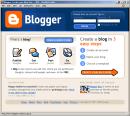
blogger screenshotDiscovery Resources
Chances are you’ve heard the term “blog” being used endlessly, but maybe you’re not quite sure what blogs are and how they work. This week we are going to become familiar with blogs and even start a blog yourself. Blogs are a form of online journal, where people post their thoughts, opinions, news, or other information. They can also be used to share pictures, video files, and other media. To learn more about what blogs are and why people use them, visit
Blogger’s Quick Tour. For those who want more info about blogs, check out this Wikipedia article.

Perhaps you're wondering how blogging is relevant to libraries? Blogs are an increasingly popular means of sharing information and opinions. Many libraries use them to share information about library programs and services with their customers, and many people read blogs as an important source of news and information. Yet, it's not just about sharing information and thoughts. Blogging is also about inviting people to participate in the conversation by leaving comments.

Now, it’s your turn...

By now, you’ve done some exploring around this website and understand how this program will work. It’s time to set up your very own personal blog to begin recording your thoughts, discoveries and exercises. For this program, I recommend that you use Blogger*, a popular free online blog hosting service that is extremely easy to use.

Creating a blog using Blogger takes just three steps:

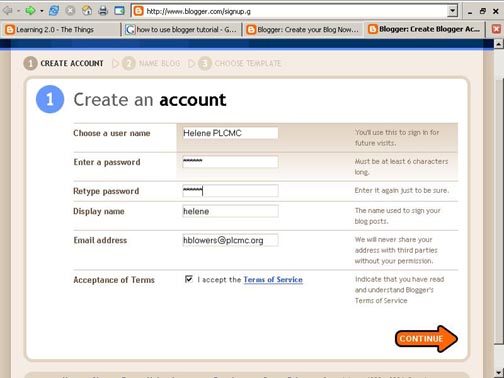
  1. Create an account (view screenshot)
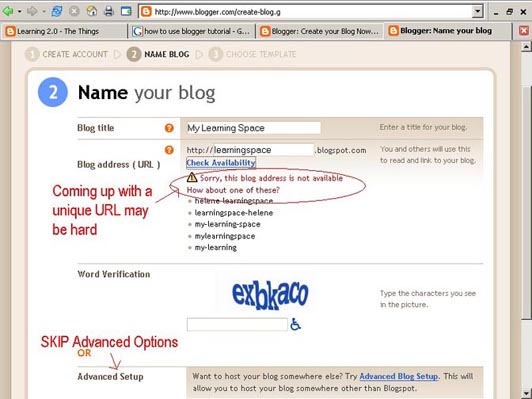
  2. Name your blog (view screenshot)
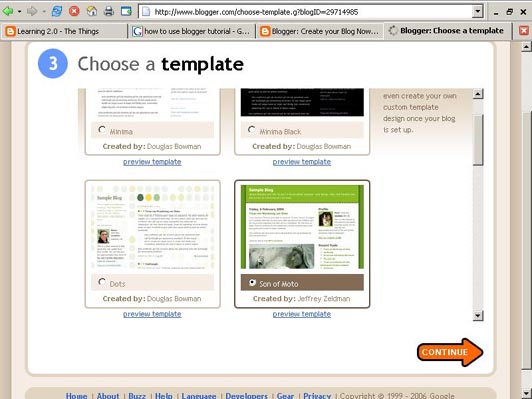
  3. Select your template. (view screenshot)

Once you’ve created your blog, here are two important things to know:

  • To add posts: When you want to add posts, edit or change the set-up your blog, you need to log in at http://www.blogger.com/. Be sure to keep track of your login and password.
  • To view your blog: Your blog address is http://(xxxx).blogspot.com, (xxxx)=the unique identifier you entered in Step 2. This is where people go to read your blog. Be sure to also write down your blog address.
If you run into problems or would like more information about blogs and using Blogger here are some discovery resources you can use:

Discovery Exercise:

  1. Setup a blog for yourself through Blogger.
  2. Add a test post or two.
    Note: Use one of your test posts to create an entry about the habits among the 7 and 1/2 lifelong learning habits that is easiest and hardest for you & why.
  3. Have fun!!!!

IMPORTANT NOTE: How you choose to identify yourself on your blog is your choice. You can blog under a screen name, anonymously, or as yourself. In order to get credit for participating in the Learning 2.0 program -- and therefore qualify for the reward prize -- you have to send an email to Jerianne (jthompson@linebaugh.org) with your blog’s address. When you post a blog entry to complete a Discovery Exercise, please include an indication in the title of the blog post. For example: #3 Test Blog Entry. Your blog entries should be substantive to receive credit: try for at least 100 words (about the size of this paragraph).

You can write about other topics (besides the Learning 2.0 program) in your blog, if you like. But remember that your blog may be read by your coworkers, your supervisors, or even complete strangers. You may want to read this article - How to Blog Safely - which provides some helpful tips about how you can control the amount of information you reveal about yourself on your blog.

Discover More
From time to time, we will give you some “bonus” exercises. It is not required for you to complete these additional activities. But if the Discovery Exercises aren’t enough of a challenge for you…

Listed below are a few local blogs I discovered. Take some time to explore these blogs to see the variety of ways in which blogs are used. Can you find other local blogs to share?


Here's another resource
Several of our Things feature videos by Common Craft, which give short, easy-to-understand explanations about various things. Here's there new Blogging in Plain English video:


*
Use of Blogger is only a recommendation. If there is another blog hosting site that you are more comfortable with, please feel free to use it.

Portions of this entry were adapted from 10 Things at SPL.

Participants

Listed below are the participants in the LPLS Learning 2.0 program: